Scan to BIM Best Practices for As-Built Accuracy in 2026 Projects
Table of Contents
Every renovation project begins with the same question: what exactly exists on site right now? The answer decides design decisions, about how the new design fits, where overlaps will come up, what needs to be demolished and what can be retained.
Traditional site surveys with tape measures and 2D drawings have small errors from the moment they were produced. By the time those measurements reached a design model, conditions had often already changed. Scan to BIM has changed that.
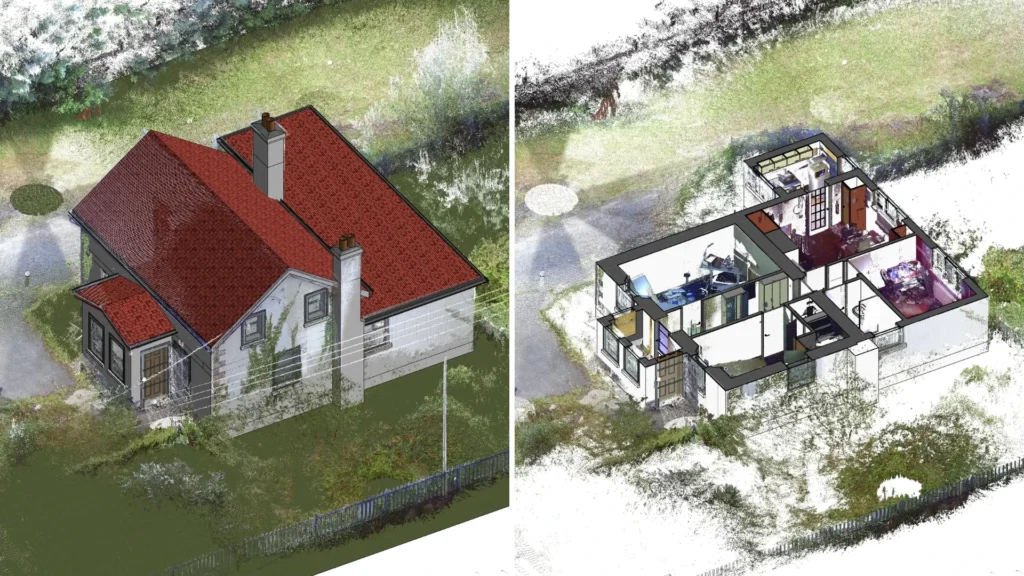
Detailed point cloud data of existing site conditions
What is Scan to BIM?
Scan to BIM is the process of capturing a physical building or site using a 3D laser scanner, known as LiDAR. It then converts the resulting point cloud data into a detailed BIM model.
The point cloud is a collection of millions of measured points, each mapping the exact position of a surface in 3D. When registered and processed correctly, it becomes an accurate digital representation of existing conditions that can be used for design and construction. This point cloud is then modelled in Autodesk Revit or an equivalent BIM software.
With this, the project teams now start with a verified digital replica of what is actually there.
This guide covers the Scan to BIM best practices that determine as-built accuracy, from the initial setup to final model delivery.
Did You Know?
The adoption of mobile LiDAR scanning has increased by 45% in the UK and Scandinavia, as hardware advancements now allow for millimeter-accurate data capture at walking speeds, significantly reducing site downtime.

Scan to BIM Best Practices in 2026
Establish Purpose and Scope
The most common cause of inaccurate Scan to BIM models is poor scanning. And poor scanning almost always begins before the scanner is ever switched on.
Every project requires a scan plan first. This defines the scanner positions, the overlap between scan stations, the areas that require higher density capture, and the targets that will be used to register multiple scans into a single cohesive point cloud.
Without a scan plan, teams arrive on site and scan reactively, without a consistent strategy. The result is a point cloud with gaps and registration errors that cannot be corrected once the scanner has left the site.
Register Point Clouds with Accuracy
A single laser scan covers only what the scanner can see from one position. A complete building requires dozens, sometimes hundreds, of individual scans. Registration is the process of aligning all those individual scans into a single point cloud.
Registration errors are where accuracy is most commonly lost. If two scans differ by even a few millimetres, every element modelled from that data will carry that error.
Best practices for registration include:
- Use target-based registration whenever possible; registration based on fixed spheres/checkerboards is more accurate than cloud-to-cloud registration alone
- Test registration accuracy throughout the process, rather than only after its completion.
- Use software such as Autodesk ReCap and Leica Cyclone for professional-grade registration workflows.
- Maintain a registration log detailing the accuracy of registration for each scan; it will later be included in the overall quality control record.
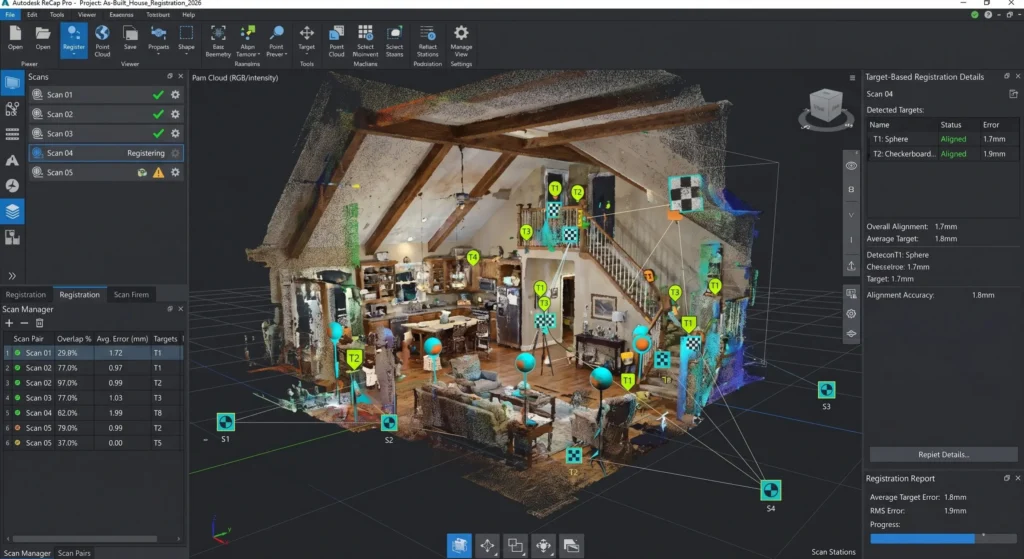
Aligning LiDAR scans using target-based registration
Risk Mitigation Through Digital Information Management (DIM)
High-precision scans are only the first step in protecting your investment. Explore how integrating these datasets into a wider Digital Information Management (DIM) framework helps the team mitigate the risks of rework, miscommunication, and unforeseen site conditions before they impact your bottom line.
Define Level of Development (LOD)
A common mistake in most Scan to BIM projects is failing to determine the required LOD of the resulting BIM model before starting modelling.
This mistake leads to an overly detailed model in some places and an under detailed one in other places. Elements which will require MEP coordination may be modelled at LOD 200 while they should have been modelled at LOD 350. Meanwhile, structural elements that only need approximate positions may be modelled at LOD 400, consuming time and budget.
LOD must be agreed with the client and defined in the project brief before starting. The right LOD depends on how the model will be used:
- LOD 200 for early feasibility studies and spatial planning
- LOD 300 for design development and construction documentation
- LOD 350 for multi-discipline coordination and overlap detection
- LOD 400 for fabrication and installation of specific elements
- LOD 500 for full as-built documentation and facility management handover
Did You Know?
Recent studies indicates that contractors utilizing integrated BIM and laser scanning for objective progress monitoring achieve up to a 60% reduction in rework and a 30-50% decrease in field RFIs.
Test the Model against the Point Cloud
Modelling is not the final step. Validation is. Before any Scan to BIM model is delivered to a client, it must be checked against the point cloud it was built from.
This is not a visual check, but a systematic comparison of modelled element positions against point cloud geometry to confirm that the model represents actual site conditions within the agreed tolerance.
This validation record is increasingly becoming a contractual requirement. Clients who rely on as-built models for renovation design or facility management need documented evidence that the model was checked.
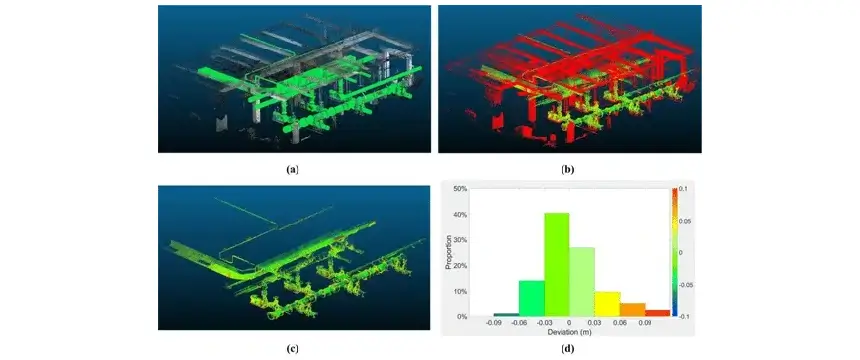
Point cloud deviation heat map for BIM validation – Source
Conclusion
Scan to BIM is no longer a niche specialty. With all building types and regions utilizing it, Scan to BIM has now become a norm for every renovation project workflow. Technologies and software necessary are now readily available and the argument for starting an existing-conditions project with a verified, digital representation of reality is very strong.
But accuracy is not guaranteed only by the scanner. It is built into every step of the process from the to the final data structure.
Teams that treat Scan to BIM as a fast shortcut to existing conditions documentation will produce models that create more problems than they solve. Teams that treat it as a precision workflow, where every decision is made intentionally and every output is verified, will produce models that form a reliable foundation for everything the project needs to do next.
BIM Modeling for Global Projects
From conceptual LOD 100 to fabrication-ready LOD 500, the team at BIM Services India provides data-rich Revit models and high-fidelity as-built verification tailored to your specific regional codes and project requirements.
Frequently Asked Questions (FAQ’s)
Is Scan to BIM only for large projects?
Not anymore. In 2026, it has become standard practice across all building types and project sizes. The technology is accessible and the case for starting with verified existing conditions is hard to argue against.
What LOD should a Scan to BIM model be delivered at?
It depends entirely on how the model will be used. LOD 200 is for feasibility. LOD 300 for design and documentation. LOD 350 for coordination, LOD 400 for fabrication and LOD 500 for full as-built handover.
